Puzzle Kids: Jigsaw Puzzles
- 4.4
- Rating
- 50.00M
- Installs
- Free
- Price
 Analysis by App-foxy
Puzzle Kids: Jigsaw Puzzles is the kind of game I would keep ready for a preschooler who enjoys fitting pieces together but is not yet ready for complicated rules, timers, or reading-heavy challenges. After spending time with it, my main impression is simple: it succeeds because it keeps the central action clear and approachable. Children can focus on recognizing shapes, matching parts, and completing cheerful pictures without having to learn a large system first.
That simplicity is also the reason I would not recommend it to every family. This is an educational puzzle game for young children, not a broad learning platform or a serious test of logic. It works best as a short, calm activity for preschool practice, travel, or a quiet moment at home. Older children may move through its challenge too quickly, while parents looking for detailed progress reports or a deep curriculum will probably want something more specialized.
How the puzzle experience works for young players
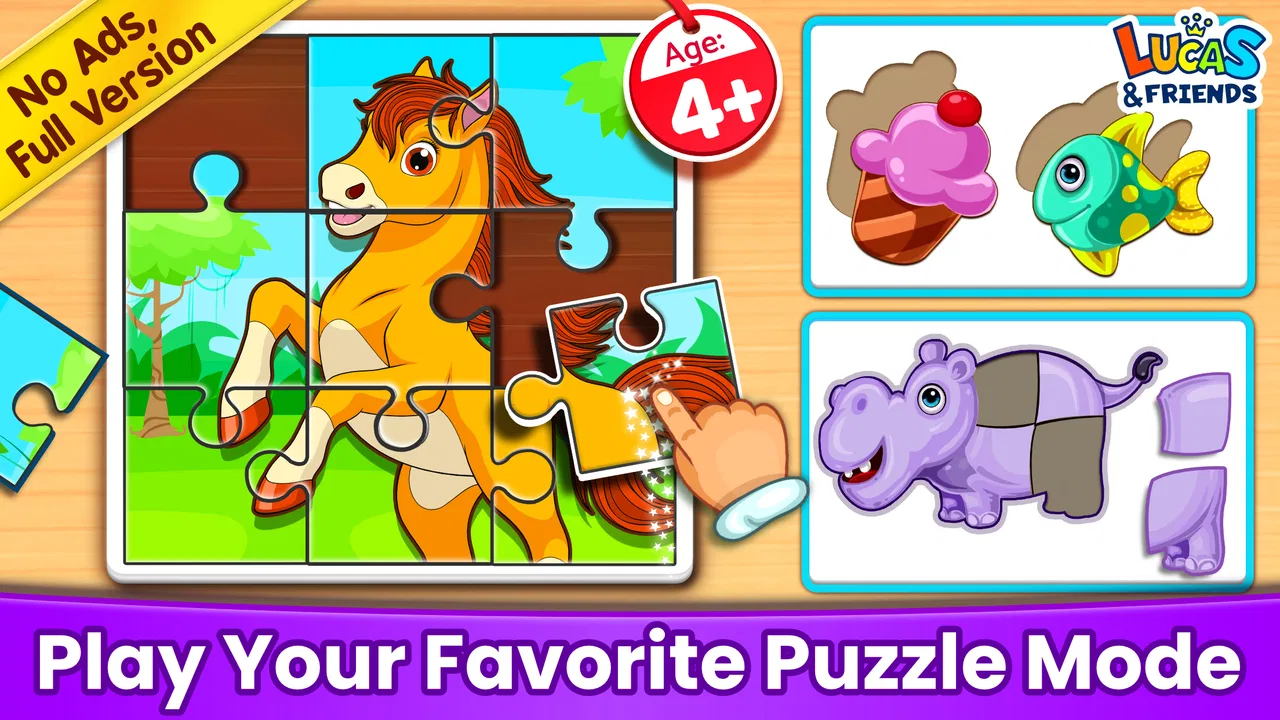
The game is built around the familiar jigsaw idea, translated into a format that makes sense on a touchscreen. A child sees a picture being assembled and moves pieces into place. That basic interaction is valuable for this age group because it gives an immediate visual goal: instead of explaining a long set of instructions, an adult can show the first piece and let the child discover the rest.
You May Also Like

 Blood Strike: 2.5 Anniversary
Blood Strike’s Loadouts Turn Every Drop Into a Tactical Gamble
A close look at Blood Strike’s custom loadouts: how fast access to signature weapons reshapes its battle royale rhythm, rewards preparation, and narrows the gap between fights.

 Pandora - Music & Podcasts
Pandora’s Music Is Easy to Start, but Harder to Recover
Pandora’s strength is its low-effort path from a seed to a station. Its weak spot is how much confidence it asks you to place in connection, setup, and quiet recovery.

 8 Ball Pool
 Is Built on Rivalries, Rematches, and Routine
A close look at the rivalries, rematches, shared routines, and unanswered safety questions that turn a quick pool match into a persistent mobile community.

 Samsung Music
’s Quiet Strength Is Playing What You Already Own
Its reach comes less from spectacle than from dependable access to a personal library. That simplicity is both the app’s strongest retention engine and its ceiling.

 AccuWeather: Weather Radar
AccuWeather Review: A Quick, Clear Forecast for Everyday Decisions
For everyday plans, the best forecast is the one you can understand quickly. AccuWeather makes rain timing, radar, and local conditions easy to act on, with a few trade-offs.

 Hill Climb Racing
Why Hill Climb Racing Still Turns Crashes Into One More Run
A tiny car, a bumpy hill and one more upgrade: Hill Climb Racing keeps resurfacing because its simple chaos makes every near-miss feel personal.
More From Our News Desk
View All News


I found the strongest part of the experience to be its low barrier to entry. A child who already understands matching games can usually begin without much help. The activity encourages careful looking rather than fast tapping, and the moment a piece belongs in a particular spot gives the child a small, understandable success. Those repeated successes can make the game useful for children who become frustrated by apps that introduce too much information at once.
Because the format is so direct, it fits naturally into short sessions. I would use it while waiting at a restaurant, during a journey, or when a child needs a screen activity that is quieter than an action game. It also works as a shared activity: an adult can ask, “What color do you see here?” or “Which part looks like the top of the picture?” without taking control away from the child.
The app comes from RV AppStudios, a developer with a broad presence in family-oriented mobile software. Its audience is reflected in the Everyone content rating, and the game is free to use. That combination makes it easy to consider as a first download for a family device, especially when the goal is to offer a child a gentle introduction to digital puzzles rather than a demanding game.
What children can practice while playing
The most obvious skill is visual matching, but the value goes a little further. Moving a piece toward the correct location involves hand-eye coordination, while deciding where it belongs encourages attention to edges, colors, and recognizable parts of an image. These are modest skills, yet they are appropriate for an early puzzle experience because the child can practice them without feeling as if they are completing a lesson.
I also noticed that the game can encourage persistence in a useful way. A child may try one location, see that it does not work, and then look again instead of abandoning the picture immediately. Parents can support that habit by asking questions rather than supplying the answer. For example, pointing out a matching color or a straight edge gives a hint while leaving the final decision to the child.
One practical tip is to begin with the child sitting beside you, even if the game appears easy. The first few minutes reveal whether the child understands dragging, tapping, and the visual goal. Once that is clear, step back. The game is more useful when the child makes the match independently, and constant adult correction can turn a relaxing puzzle into a performance exercise.
Another good approach is to stop after a natural completion instead of automatically extending the session. Young children can enjoy a puzzle and still become tired of it quickly. A short break also helps keep the activity associated with concentration and satisfaction rather than passive screen time. In my experience, this matters more than trying to maximize the number of pictures completed in one sitting.
Why the straightforward design is its greatest strength
Many children’s games try to combine puzzles with stories, collectibles, sound effects, mini-games, and reward systems. That can be entertaining, but it can also distract from the skill parents hoped their child would practice. Puzzle Kids: Jigsaw Puzzles takes the opposite route. Its identity is centered on assembling pictures, so the child is not constantly being redirected to another activity.
That focus makes it particularly suitable for a child who is curious about puzzles but easily overwhelmed by busy interfaces. It can also be a useful bridge between physical jigsaw puzzles and digital play. A child who struggles with loose cardboard pieces may find the screen more manageable because the pieces are larger to handle and the completed image is always part of the same visual space.
There is a trade-off, though. A physical puzzle usually offers richer tactile feedback, and a parent can adjust the difficulty by choosing a different number or shape of pieces. A dedicated physical set may therefore be better for children who enjoy sorting, touching, and spreading pieces across a table. The app’s advantage is convenience, not a complete replacement for hands-on play.
Compared with drawing apps, this game asks for less creative decision-making but provides a clearer route to success. Compared with alphabet or counting apps, it is less directly tied to academic content, yet it may be a better choice when a child needs to practice attention and coordination without being quizzed. Compared with more elaborate children’s games, it has fewer distractions and a more predictable purpose.
The limits parents should understand before installing it
The main weakness is not that the game is poorly suited to its purpose; it is that its purpose is narrow. Completing jigsaw pictures can support observation and coordination, but it will not replace activities designed specifically for phonics, early mathematics, handwriting, or language development. I would treat it as one small tool in a child’s play routine, not as an all-in-one educational solution.
Its simplicity may also reduce replay value for some children. A preschooler who quickly understands the matching pattern may want more variety, more difficult arrangements, or a stronger sense of progression. If your child already completes substantial physical puzzles independently, this may feel more like a pleasant diversion than a lasting challenge.
Parents should also be realistic about supervision. A game being easy to operate does not automatically make every screen session meaningful. The best results come when the child has a clear stopping point and the adult occasionally connects the picture to conversation. Asking the child to describe what they assembled can turn a silent matching task into a small language exercise, while still keeping the game itself uncomplicated.
Another limitation is that the app’s free availability may make it appealing as an instant download, but “free” should not be confused with a guarantee that it will suit every family’s preferences. What matters most is whether the gameplay fits the child’s age, attention span, and tolerance for repetition. I would try it during a supervised session before making it part of a daily routine.
Who will get the most from this game
I think the best audience is preschool children who enjoy pictures, matching, and hands-on problem solving but need a gentle starting point on a phone or tablet. It is also a sensible option for parents who want a game that can be explained quickly and used in short bursts. The Everyone rating reinforces that broad family positioning, although an adult should still choose the setting and session length.
It may be especially helpful for a child who is learning to coordinate a finger movement with a visual target. Dragging a piece is a small action, but repeating it with purpose can build confidence with touch controls. I would not present this as therapy or as a formal developmental program; I would simply see it as an accessible way to practice a basic digital interaction while completing something recognizable.
A realistic everyday use would be a parent preparing dinner while a child sits nearby with the tablet for a few minutes. The parent could help start the first puzzle, then check in between tasks and ask the child to explain which piece is being searched for. That keeps the activity connected to conversation and avoids treating the game as an unattended substitute for interaction.
It can also work well for siblings at different stages, provided expectations are adjusted. A younger child may need help identifying where a piece belongs, while an older preschooler may be able to complete the same activity independently. The older child could describe the picture or offer a verbal clue rather than taking over. This turns a simple game into a cooperative moment, though it will not provide a genuinely advanced challenge for the older player.
I would skip it if the child wants fast movement, competition, or constant novelty. I would also choose another type of app if the main goal is structured reading practice, number recognition, or creative drawing. Families seeking a detailed learning path should look toward a curriculum-focused educational app, while families wanting tactile concentration practice may prefer a box of physical jigsaws. This game is strongest when its modest scope is exactly what you need.
Technical details and day-to-day practicality
The game was released on June 28, 2017, and its current version is 2.1.7. It requires Android 6.0 or later, which means owners of older devices should check compatibility before planning to use it on a hand-me-down phone or tablet. On a supported device, the free price removes the need to make a purchase decision before seeing whether the child responds well to the format.
Its popularity is easy to understand: the game has passed 50 million installs, holds a 4.5 average from around 37 thousand ratings, and has 393 written reviews. Those figures suggest that it has reached a large family audience, but they should be read as context rather than proof that every child will enjoy it. A young player’s reaction depends much more on puzzle familiarity, attention span, and whether the visual style feels engaging.
For parents deciding whether it will run on a family device, the operating-system requirement is the first practical check. For parents deciding whether it will hold attention, the more useful test is behavioral: does the child look carefully before moving a piece, and do they want to complete another picture after finishing one? If the answer is yes, the game is probably filling its intended role. If the child immediately asks for racing, building, or storytelling, a jigsaw-focused app may not be the right fit.
I also recommend keeping the device positioned where an adult can see the screen. That is not because the puzzle itself is complicated, but because visible placement makes it easier to notice frustration, encourage a pause, and turn the images into conversation. A child who is stuck may need only a small hint about an edge or color. Giving that hint at the right moment is more helpful than solving the whole puzzle for them.
My verdict after using it with a young-child mindset
My final view is that Puzzle Kids: Jigsaw Puzzles earns its place as a simple, approachable option for preschool puzzle play. It does not try to be a complete educational environment, and I appreciate that restraint. The strongest evidence in its favor is the clear connection between the child’s action and the result: look, choose, place, and see the picture come together.
The same focus creates its boundaries. Children who need a wider range of subjects or a stronger progression may outgrow it, and families wanting tactile or curriculum-based learning will find better alternatives elsewhere. I would also avoid presenting it as a replacement for conversation, physical play, or real jigsaw puzzles.
My recommendation is to treat it as a short-session puzzle companion, not a digital babysitter or a full lesson plan. For a child beginning to explore matching and visual problem solving, the free game from RV AppStudios is easy to try and simple to understand. If your child enjoys completing pictures and benefits from calm repetition, it is worth keeping installed. If they need advanced challenges or academic instruction, move on to a more specialized choice once this format stops being engaging.
FAQs for Puzzle Kids: Jigsaw Puzzles
01What is Puzzle Kids: Jigsaw Puzzles?
Puzzle Kids: Jigsaw Puzzles is an educational app designed to help children develop cognitive skills through interactive jigsaw puzzles. The app offers a variety of puzzles with colorful and engaging images, making learning fun and effective for young minds. It’s suitable for kids of all ages and provides a safe, ad-free experience.
02Is Puzzle Kids: Jigsaw Puzzles safe for children?
Yes, Puzzle Kids: Jigsaw Puzzles is designed with child safety in mind. The app is free from ads and in-app purchases, ensuring a distraction-free experience. Additionally, it features parental controls to manage access and monitor progress, providing peace of mind for parents while their children enjoy the puzzles.
03What age group is Puzzle Kids: Jigsaw Puzzles suitable for?
Puzzle Kids: Jigsaw Puzzles is ideal for children aged 3 to 8 years old. The app includes puzzles with varying levels of difficulty to suit different age groups and skill levels. This ensures that both younger children and those in the early stages of school can benefit from the cognitive challenges presented.
04Does Puzzle Kids: Jigsaw Puzzles require internet access?
No, Puzzle Kids: Jigsaw Puzzles can be enjoyed offline. Once downloaded, all puzzles are available without the need for an internet connection. This makes it a convenient option for keeping children entertained during travel or in situations where Wi-Fi access is limited.
05Can parents track their child's progress in Puzzle Kids: Jigsaw Puzzles?
Yes, the app includes features that allow parents to track their child's progress. Through the app’s parental controls, parents can monitor completed puzzles and time spent on the app. This functionality helps in understanding the child’s learning curve and areas that might need more focus.
Pros
- Engaging and colorful graphics.
- Easy to navigate for young users.
- Variety of puzzles keeps interest.
- Educational and fun mix.
- No in-app purchases.
Cons
- Limited puzzles in free version.
- No multiplayer mode.
- Ads can be distracting.
- Requires internet for updates.
- Limited language options.

Puzzle Kids: Jigsaw Puzzles
Gallery